









.png)





.svg)
.svg)
.svg)







.png)
.png)






.jpg)

%20F%20(1).jpeg)







.webp)






 Login
Login
Many organisations manage policies using a combination of general-purpose document management platforms and email approval chains. This can be manageable at a small scale, although still open to version control risks and security vulnerabilities. As you scale, this process becomes difficult to control, making it harder to confirm which version is current, who approved it and whether it reached the right people.
This lack of evidence creates a governance risk within your policy process, as highlighted in the following frameworks:
-
The European Banking Authority (EBA) guidelines on internal governance call for a “clear organisational structure with well-defined, transparent and consistent lines of responsibility”.
-
ISO 37301:2021 provides guidance on establishing, evaluating and improving an effective compliance management system.
- Manual processes and shared drives become harder to control as policy volumes, employee numbers and evidence requirements grow.
- Choose a policy management approach based on your organisation’s scale, audit obligations, internal capacity and total administrative cost.
- Cloud file storage makes it easier to organise files but is not designed to manage the complete policy lifecycle.
- Dedicated policy workflow tools provide version control, automated follow-up and audit evidence without the cost and complexity of a full GRC platform.
- Before automating, clean up your policy library, assign clear owners and migrate high-risk policies through a defined workflow first.
Compare the five ways to manage policies
| Method | Control |
Evidence | Workflow | Cost | Scale |
|---|---|---|---|---|---|
| Manual files on shared drives |
Low: no enforced version, approval or distribution controls |
Low: no reliable trail |
Manual, email-driven | Very low | Poor |
| Microsoft 365 / SharePoint libraries |
Low/Medium: permissions and version history help, but control level depends on setup and manual processes |
Medium: version history and general audit logs, not policy-specific | Basic approvals, no full lifecycle | Low (companies often already own licences) | Moderate: storage scales, but the workflow doesn't |
| Dedicated policy workflow tool |
High: enforces ownership, version control, approvals and distribution |
High: built-in policy audit trail | "Full create → approve → distribute lifecycle" |
Medium | Strong |
| Full governance, risk and compliance (GRC) platform |
High: configurable policy controls connect with wider risk and compliance processes |
High: across risk and compliance | Broad, configurable | High | Strong |
| Outsource to a legal advisor |
Low/Medium: the advisor controls drafting and review, but the organisation has less day-to-day oversight. |
Medium: held by the advisor | Advisor-led, slower cycles | Scales with volume | Limited: cost and delay rise with volume |
-
Files on shared drives
-
Pros: Cheap, familiar and quick to set up.
-
Cons: Version control, approvals and acknowledgements depend on manual work. The approach becomes harder to manage as your policy and employee numbers grow.
Pros: Cheap, familiar and quick to set up.
-
-
Microsoft 365 or SharePoint libraries
-
Pros: Provide central storage, search, permissions and version history using software many organisations already have.
-
Cons: Do not provide a complete policy management workflow without additional configuration or tools.
-
-
A dedicated policy workflow tool
-
Pros: Manages the creation, approval, distribution and acknowledgement in one place. It also automates routine follow-up, retains an audit trail and shows the compliance team what still needs attention.
-
Cons: Requires a software licence, initial setup and engagement from policy owners. It may not provide the wider risk and audit functions included in a full GRC platform.
-
-
A full GRC platform
-
Pros: Connects policy management with the organisation’s wider risk, control and audit framework.
-
Cons: Can be expensive and take longer to implement. Its complexity and administrative demands may be disproportionate for organisations that mainly need to improve policy management.
-
-
Outsourcing to a legal advisor
-
Pros: Gives the organisation access to legal expertise and reduces the drafting burden on your internal teams.
-
Cons: Can result in slower updates, less direct oversight and increasing costs as the workload grows. The organisation also retains responsibility for compliance. If there is a breach of your obligations, it is your company that bears the consequences rather than the advisor.
-
How to choose the right approach for your organisation
The best method for choosing the right policy management process is not necessarily to look for the most feature-packed solution. It is about finding the approach that gives you enough control and evidence without adding unnecessary cost or complexity.
Start with your size and maturity
A firm with five staff and a small policy library may be able to manage documents manually, albeit with caution to avoid human error and maintain version control. A listed mid-cap with several departments, entities and regulatory obligations needs stronger ownership, workflow and reporting. Consider both your current position and where the organisation expects to be in the next few years when deciding on how to build in automation.
Assess the evidence you must provide
Think about what regulators, auditors, customers or accreditation bodies may ask you to demonstrate. If you need to produce approval histories, distribution records and employee acknowledgements on demand, shared drives and email chains will soon become difficult to rely on and time consuming to search through. A dedicated policy workflow tool captures this evidence automatically during the process.
Check your policy volume and rate of change
Count how many policies you manage and how often they need to be reviewed or updated. Automation is increasingly valuable when you find you have several policies moving through the process of drafting, approval and distribution at the same time. Frequent regulatory changes make it difficult to keep up when using only manual tracking.
Be realistic about internal capacity
Consider who maintains the policy register, follows up with approvers and monitors acknowledgements. If your compliance team has limited capacity, look for a system that automates routine administration. Outsourcing may provide specialist support, but it can also reduce the day-to-day control you have over your policies and become expensive as the workload grows.
Calculate the total cost
Do not compare options using licence fees alone. Include the time your staff spend searching for documents, chasing responses, preparing for audits and correcting avoidable mistakes. A low-cost manual process can become expensive once you include these hidden costs.
For many listed organisations, a dedicated policy workflow tool provides the most practical balance. It offers structured approvals, version control, automated reminders and audit evidence without the cost and implementation burden of a full GRC platform.
Why dedicated policy workflow tools are the practical choice
Dedicated tools provide the control and evidence that organisations need without introducing the complexity of a full GRC platform.
-
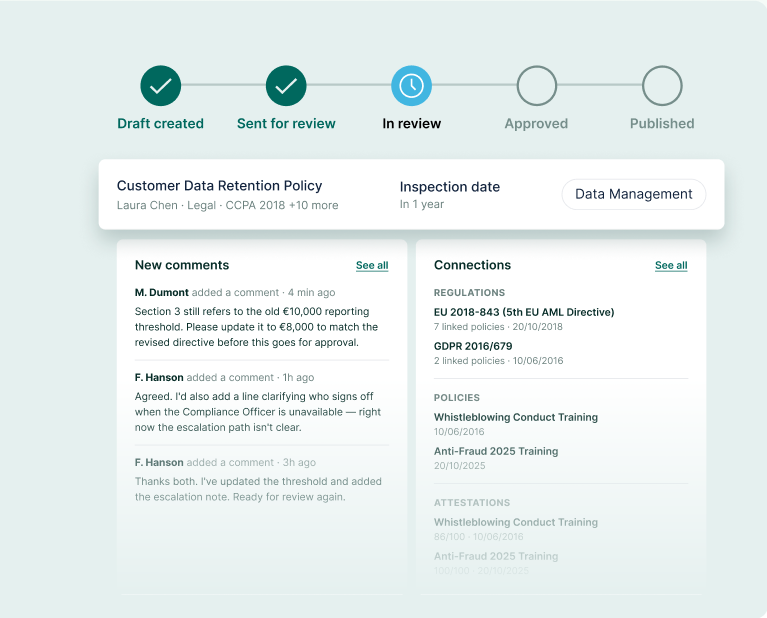
Run the complete policy lifecycle in one place. Create, review, approve, publish and distribute policies through one connected process rather than moving between shared drives, email and spreadsheets.
-
Know which version is current. Version control gives employees access only to the approved policy while retaining previous versions and their history for your audits.
-
Capture audit evidence as you work. The system records who reviewed and approved each policy, when it was published and who acknowledged it. Your compliance team can retrieve this evidence without having to reconstruct the process from disparate emails.
-
Reduce manual follow-up. Automated reminders keep reviews, approvals and attestations moving without relying on your compliance team to chase every action.
-
Keep team members accountable. A central overview shows who owns each policy, what stage it has reached and whether there are any outstanding actions.
-
Avoid unnecessary GRC complexity. You get a structured policy workflow and reliable reporting dedicated to the policy management process without implementing a broad and overpowered platform designed to manage every area of risk, audit and compliance.
- Scale without rebuilding. The same workflow can support you as you grow and have to include more policies, employees and entities into the policy management process.
How to move from manual to an automated workflow
Here are the steps you should take to create an automated policy management workflow for your organisation.
-
Audit what you already have. Create an inventory of current, duplicate, outdated and missing policies. Identify documents with no clear owner or approval record and deal with that before you transfer them into the new system.
-
Assign an owner to every policy.Confirm who is accountable for the content, review date and required updates. The automated workflow needs a named person to receive tasks and act on reminders.
-
Define the process before choosing the tool. Map how a policy should move from drafting through approval, publication and acknowledgement. Remove any unnecessary stages and make it clear how to escalate any issues.
-
Focus on evidence, not feature count. Check whether the system records version history, approvals, distribution and attestations in a form you can retrieve easily. Your reporting should show what is complete, outstanding or overdue in a straightforward manner.
-
Migrate the highest-risk policies first. Start with documents that face the most regulatory scrutiny or affect the largest number of employees. Use the first migration to test the workflow before moving the rest of the library.
-
Set review dates from the start. Add a review cycle to every policy you migrate and keep a clear record of who received each version. This prevents the new repository from becoming another store of outdated documents.
Frequently Asked Questions
SharePoint is good for storage and version history, but it was not built to run and evidence a policy approval and distribution workflow without add-ons.
A workflow tool focuses on the policy lifecycle; a GRC platform spans risk, audit and compliance at greater cost and complexity. To use a GRC for just policy management would not be an efficient use of funds.
Automated workflows produce a timestamped trail of approvals and distribution so you collect evidence of compliance in minutes rather than reconstructing it.
Outsourcing can help when your organisation lacks specialist knowledge or needs additional support with drafting and regulatory updates. However, appointing an advisor does not relieve your company of its responsibility for compliance. Your team must still approve, implement and monitor the policies and may be liable if a breach occurs.
Conclusion
There are a range of options available when you look to move from a manual policy management process to an automated workflow. You must balance the efficiency and security of capturing evidence and ensuring all parties work from the latest version with the cost implications. This is why a full GRC platform might be overpowered for your needs and outsourcing to an external advisor is costly and at the expense of control over your process. Look for a dedicated policy workflow platform that can scale with your organisation.
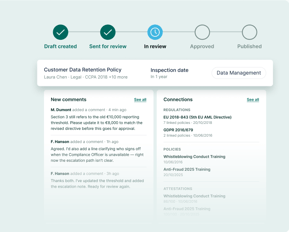 Stop reconstructing your approval history from old emails. PolicyLog lets you manage your entire policy lifecycle in one place so you always know who owns each policy, which version is live and who has acknowledged it. Reminders keep reviews and attestations moving on their own, helping you reduce administrative work.